Cubinator
An Arduino-powered Rubik's Cube solving robot.
Overview
During my second semester of bachelor’s, I was spending a lot of time practicing to solve a 3×3 Rubik’s Cube quickly. My roommates, Utkarsh and Versha, were already speedcubing and could solve a variety of cubes, some in under 20 seconds.
As part of an Electronics course, we were challenged to build a working prototype for under $20. Since all three of us could solve a Rubik’s Cube, we asked ourselves: why not build a robot that could solve one too?
My Contributions
- Designed and laid out the electronics and mechatronics.
- Developed the Arduino-based motor control system.
- Integrated servo and DC motor actuation with the mechanical assembly.
System
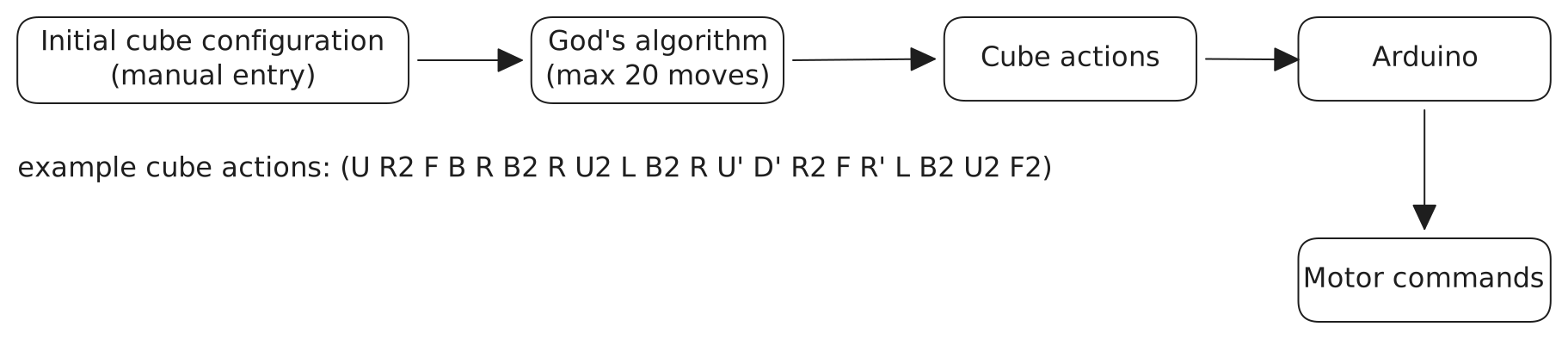
Cubinator is an Arduino-powered Rubik’s Cube-solving robot. It takes the cube’s initial configuration as a sequence of colors representing the tiles on each face. It then uses God’s Algorithm [1] to generate a sequence of cube rotations required to solve the given configuration. These rotations are executed by an Arduino through open-loop control of DC and servo motors. The robot takes approximately two minutes to solve a given configuration.
We initially planned to use a smartphone camera to detect the colors on each face of the cube. However, we encountered inconsistencies in distinguishing between red and orange under different lighting conditions. Since we were unable to resolve this issue within the project timeline, we instead manually entered the cube’s color configuration using a laptop connected to the Arduino. God’s Algorithm processed the input configuration on the laptop, and the resulting sequence of cube rotations was then sent to the Arduino for execution.
For the mechanical system, we designed and 3D-printed custom rack-and-pinion gears and claws to hold and rotate the individual faces of the Rubik’s Cube.
Technical Highlights
- Microcontroller: Arduino
- Actuation: Servo motors + DC motors
- Mechanical components: Custom 3D-printed rack-and-pinion gears and cube-holding claws
- Planning: God’s Algorithm
- Control: Open-loop motor control
- Input: Manually entered cube configuration
- Average solve time: ~2 minutes
Team
Sumit Patidar · Utkarsh Kunwar · Versha Dhankar · Vipin Tolia · Shubham
References
[1] God’s algorithm. Wikipedia. Available at: https://en.wikipedia.org/wiki/God%27s_algorithm (Accessed: 5 October 2022)